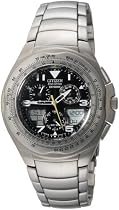
A handsome analog with the functions of a digital

For years I've worn a cheap digital watch because I couldn't find anything nicer looking that incorporated the same functions as my digital. Analog watches offer a more attractive timepiece but you usually have to sacrifice the handy functions I had grown used to having. For me the Eco-Drive Skyhawk combines the best of both the analog and digital worlds.
The Skyhawk has two small LCD's that give it all the same functions as my digital and even add a few more. You access those different functions by turning the winding crown (which actually doesn't even serve that function on the Skyhawk since the watch is powered by a solar cell beneath the faceplate). Turning the crown rotates the tiny mode hand on the bottom-most dial and points it at the abbreviated name of the function you've selected.
The functions displayed on the LCD's are: Time (hour minutes and seconds on the right display with the time zone on the left); Calendar (day month and day of the week on the right time zone on the left); Alarm (there are three separate alarms-hour minutes and `on' and `off' on the right time zone on the left); Chronograph (up to 99' 99" on the right the left indicates split time etc.); Timer (counts down from 99' 99"); and Set which is for setting up the time date etc. for the watch. You can program in customized names for the time zones if you choose. For example instead of LAX for Pacific Time I have SEA (for Seattle) programmed for my time zone. Since the analog hands show my local time I leave the LCD in Calendar mode but you could also have a different time zone's time or date set to display.
The other two small dials show a 24-hour UTC clock (Universal Time Constant-same as London time) in the upper-right dial (with minute and hour hands) and a 24-hour clock (with just an hour hand) for your local time zone in the upper-left dial. My watch arrived with the proper date and time already programmed in. I just had to set the watch to my time zone.
There is a slide-rule bezel that rotates around the faceplate and apparently can be used to calculate fuel and oil consumption for an aircraft. I didn't notice anything in the instructions that explained how to use this but I'm not a pilot or engineer and don't have a use for it anyway.
The Skyhawk ships with a CD-ROM that has narrator walk you through the steps for setting up your watch and using the various functions. These identical tutorials can be accessed from Citizen's web page here: http://www.citizenwatch.com/us/frame_noflash.html. There is also a printed manual that covers the same information.
Citizen claims this watch will never need a new battery in your lifetime. The Skyhawk recharges its internal battery by way of a solar panel beneath the faceplate. When you look closely you can see that the faceplate is made of a dark but semi-transparent material like the lenses of sunglasses. With normal wear it should keep itself charged with ambient light whether indoors or out. Even if denied a light source Citizen claims a fully-charged watch can go four months before running out of power. The left LCD displays up to three horizontal bar to indicate how charged the watch is.
I only found two negatives with this watch. There is one function it does not have that my $10 digital watch does and that's a light for reading time in the dark. Lights take up a lot of battery power so I can understand why Citizen opted not to include one on a solar-powered watch but I do miss it sometimes at night. The numbers on the faceplate and the analog hands do have a glow-in-the-dark material on them but it's still not as easy to read the time in the dark as it is with my digital which has a blue backlight.
The other negative (for some people) may be the size. This is a fairly good-sized watch on your wrist. It's a little wider than most men's watches and probably a little thicker too. That said I think the faceplate size and overall design of the watch is such that it doesn't look too big on my just-under-medium-sized wrists. But it's a personal call and I can see how some might find this too big and bulky for their tastes. You may want to visit a local watch dealer to take a look before ordering.
You should know that there are three different versions of this watch with varying price tags (all metal mixed metal/rubber wristband and a Blue-Angels-commemorative version). Each version is available in either stainless steel or titanium. Mine is the all-metal stainless-steel version. I weighed the pros and cons of titanium and decided against it. Relative to stainless steel titanium is more resistant to corrosion has greater tensile strength and is lighter. But I can't imagine any scenario in which I'm going to need those advantages. The watch's weight is a non-issue to me. Once it's on my wrist I hardly even notice it's there. The disadvantages of titanium are it costs significantly more and has a slightly darker hue and less luster than stainless steel. Titanium is also a softer metal so it should be less resistant to abrasions.
All in all I'm very pleased with this watch. It couples a handsome understated elegance with all of the functions I want in a timepiece.
You'll have to size the watch's wristband when you get it (unless you have very large wrists). You can do it yourself if you have the proper tool. There are tiny pins holding the different links together. You need an equally small tool to push them through from one side to the other. Take note of the arrows on the inside of the wristband that show the direction you should push the pins. If you don't size it yourself be sure to point those arrows out to the person that sizes it for you. I took my watch to a jewelry counter at a respected clothing store to seek help. Unfortunately the woman who helped was lacking in hand strength and ended up scuffing up several of the metal links before I knew what she was doing (yes brushed stainless steel will scratch). If you can find the tool to do it I recommend sizing it yourself to avoid the aggravation I went through.
More detail ...


0 comments:
Post a Comment